
As technology continues to advance at an exponential rate, the demand for individuals with strong computer and IT skills also rises. One way to establish credibility in this fast-paced industry is to obtain relevant certifications. For young people who are just beginning their journey in this field, there are several certifications that they can consider getting as a prerequisite education. Here are some of the certifications worth considering:
1. CompTIA A+
CompTIA A+ is a foundational certification that covers essential computer hardware and software technologies. It is ideal for young people who are beginning their careers in the computer service and repair industry. Through this certification, candidates will learn about installing, configuring, troubleshooting, and repairing PCs, mobile devices, and various other hardware and software components.
2. CompTIA Network+
CompTIA Network+ is an entry-level certification that focuses on networking technologies and concepts. It covers topics such as network design, network protocols, network security, and various other networking-related topics. This certification is ideal for young people who want to pursue a career in the IT field.
3. Microsoft Certified Solutions Associate (MCSA)
MCSA is a Microsoft certification that covers various aspects of Microsoft technologies, including Windows, server administration, and database technologies. This certification is ideal for young people who want to specialize in Microsoft technologies.
4. Amazon Web Services (AWS) Certified Solutions Architect
AWS Certified Solutions Architect is a certification that’s designed to validate the skills and knowledge needed to design and deploy scalable, highly available, and fault-tolerant systems on the AWS platform. This certification is ideal for young people who want to specialize in cloud computing.
5. Cisco Certified Network Associate (CCNA)
CCNA is a certification that covers networking concepts and technologies, including routing, switching, security, and troubleshooting. This certification is ideal for young people who want to specialize in networking and network administration.
6. Best Buy Hardware Center Worker
I always tell people that if they are interested in hardware they should check with Best Buy about working at a hardware center. Unlike the Geek Squad which works in store and does software repairs and hardware sales the Hardware Center Workers focus on motherboard repairs, DJ jack repairs, laptop screen replacement’s, ram upgrades, and other things “hardware.”
In conclusion, obtaining relevant certifications can help young people establish credibility in the computer service and repair industry and the IT industry. By earning these certifications, young minds can gain valuable experience and knowledge that is beneficial for their future careers. So, if you’re a young person interested in pursuing a career in the computer and IT industry, consider obtaining the certifications mentioned above. These certifications will not only enhance your resume but will also help you develop the necessary skills to excel in this field.
[socialring]

Author Archives: Chris Calkins
The Mysterious Malfunction: 7 Reasons Why Motherboards Fail
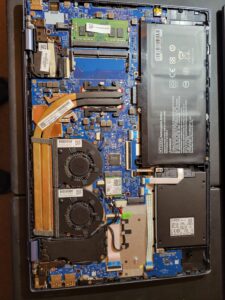
Motherboards, the core component of a computer system that connects and controls all the other hardware and software, can fail for various reasons, from simple wear and tear to sudden and catastrophic events. Understanding the causes of motherboard failure can help you prevent or troubleshoot common issues and make informed decisions about repair or replacement. Here are seven factors that can contribute to motherboard malfunctions:
1. Power surges and outages.
One of the most common and damaging factors that can affect a motherboard is a power surge or outage. A power surge happens when the voltage of the electrical supply spikes above the normal level, often due to lightning strikes or power grid fluctuations. A power outage occurs when the supply of electricity is suddenly interrupted, either by a blackout, a brownout, or a circuit breaker trip. Both situations can cause the delicate circuits and capacitors on the motherboard to overload or short, leading to permanent damage or data loss.
2. Overheating and cooling.
Another major factor that can impact the health of a motherboard is the temperature. Modern computer systems generate a lot of heat, especially when running resource-intensive applications or games, and require effective cooling systems to dissipate the heat. If the cooling system, such as the fan or the heatsink, fails or gets clogged with dust and dirt, the motherboard can overheat and produce errors or shutdowns. Conversely, if the motherboard is exposed to extremely cold or humid environments, it can suffer from condensation or frost, which can also cause corrosion or short circuits in the components.
3. Static electricity.
Static electricity, the buildup and discharge of electric charges that can occur when objects rub against each other, can also harm motherboards. When you touch a motherboard or any other electronic device, you can transfer static charges that exceed the safe levels and damage the sensitive components. To prevent this, you should always ground yourself, remove any synthetic fabrics or materials, and use an anti-static wrist strap or mat. Even small static shocks can have cumulative effects on the motherboard over time.
4. Age and usage.
Like any other mechanical or electronic device, motherboards have a limited lifespan and can wear out over time with regular usage. The precise duration and quality of a motherboard depend on many factors, such as the brand, model, materials, manufacturing process, and environmental conditions. However, a motherboard that has been used for several years or has undergone many upgrades or repairs is more likely to show signs of degradation, such as slower performance, intermittent crashes, or hardware conflicts.
5. Environmental factors.
Other environmental factors can also affect the stability and safety of a motherboard. For example, exposure to moisture, dust, smoke, and chemicals can damage the circuits and connectors, as well as attract pests or rodents that can chew on the wires or components. Moving a computer system frequently, especially during operation, can also cause mechanical stress or dislodgement of parts. Finally, using incompatible or faulty components, such as RAM, CPU, or power supply, can put additional strain on the motherboard and cause irreparable damage.
6. Malfunctioning peripherals.
Sometimes, a motherboard failure can be caused by a peripheral device, such as a graphics card, sound card, or USB drive. If one of these devices fails or misbehaves, it can send incompatible or excessive signals to the motherboard, disrupting its normal operation or causing it to shut down. To rule out this possibility, you should disconnect or replace any recent peripheral devices and see if the motherboard still exhibits the same symptoms.
7. Manufacturing defects.
Finally, some motherboards can fail due to defects or errors in the manufacturing process. This can happen despite rigorous testing and quality control procedures, and may affect only a small percentage of the products. However, if you suspect that your motherboard has a manufacturing defect, you should contact the manufacturer or the retailer and ask for a warranty replacement or repair.
In conclusion, motherboards can fail for many reasons, some of which are preventable or reversible with proper care and maintenance, while others require professional diagnosis and treatment. By keeping your computer system clean, cool, and grounded, and by using reliable and compatible components, you can help extend the life of your motherboard and avoid costly repairs or replacements.
[socialring]
What is the New Wi-Fi 6 and Do I Need it for My Home Network?
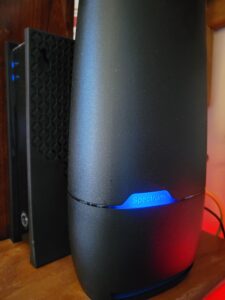
As the world becomes more dependent on digital connectivity, Wi-Fi has become an essential part of our daily lives. With the increasing demand for high-speed, reliable internet, the technology behind Wi-Fi is constantly evolving. This is where Wi-Fi 5 and Wi-Fi 6 come into play.
It’s noteworthy that the Wi-Fi Standards (Wi-Fi 4, Wi-Fi 5, Wi-Fi 6, etc.) are kind of like “generations” and are set by the Institute of Electrical and Electronics Engineers (IEEE). This is so we can have uniform standards in the industry which aids in communication, manufacturing, research, implementation, etc. Furthermore, it’s worth mentioning that these are different from (and often confused for) the frequency bands of 2.4 GHz vs. 5 GHz that your wi-fi router uses. Finally, these standards are not the same thing as your download speeds (measured in MBPS) or signal density (measured as bars that represent a percent of gain or loss of signal).
Wi-Fi 5, also known as 802.11ac, was introduced in 2013 and provided faster speeds, improved performance in crowded areas, and better power efficiency than its predecessor, Wi-Fi 4 (802.11n). The maximum theoretical data transfer rate of Wi-Fi 5 is 3.5 Gbps, with support for up to eight spatial streams.
Wi-Fi 6, also known as 802.11ax, is the latest standard in wireless networking technology that was introduced in 2019. It is designed to address the increasing demand for faster and more reliable network connections, especially in heavily populated areas. Wi-Fi 6 offers a maximum theoretical data transfer rate of up to 9.6 Gbps and supports up to 12 spatial streams.
One of the most significant differences between Wi-Fi 5 and Wi-Fi 6 is the use of a newer technology known as Orthogonal Frequency-Division Multiple Access (OFDMA). OFDMA allows multiple devices to be served simultaneously by splitting channels into smaller subchannels. This means that Wi-Fi 6 networks can efficiently handle many devices at once, reducing network congestion and improving the overall user experience.
Another key difference between the two standards is the improved signal strength and range offered by Wi-Fi 6. With its ability to increase efficiency and reduce interference, Wi-Fi 6 can provide better coverage and range in comparison to Wi-Fi 5. This ensures that users can experience fast and reliable internet connections, even at a distance from the router.
Finally, Wi-Fi 6 also introduces a new feature called Target Wake Time (TWT), which enables devices to conserve battery by scheduling when they wake up and communicate with the network. This reduces power consumption and can lead to longer battery life for connected devices.
In conclusion, Wi-Fi 6 is a newer, faster, and more efficient standard of wireless networking technology. When compared to Wi-Fi 5, it offers higher speeds, better range, improved power efficiency, and the ability to handle more devices at once. As more devices become connected to the internet, these improvements will be increasingly important in ensuring a smooth and reliable user experience for everyone.
[socialring]
Did You Just Get Hacked? No, Probably Not.
As a computer service company owner in Louisville, KY. for the past few years the prevalence of people calling me saying “I’m hacked” has continued to escalate. As technology continues to rapidly advance, cybersecurity threats become more prevalent. However, it is not usually the case that your computer is hacked. Often, people mistakenly blame hacking for a problem that is their own fault.
Here are some examples of such scenarios:
1. Forgotten Passwords: Many times, users lose access to their accounts due to forgetting their password. Instead of seeking assistance from the platform, they tend to believe that a hacker breached their account. Most of them do not realize that they have simply forgotten their password or have forgotten they changed it and blame hackers for a user created problem.
2. Third-Party Programs and Garbage Software: Many users install applications or software from various websites without verifying their authenticity. I routinely find machines with anywhere from one to twenty pieces of garbage software installed. Often the user is playing games when doing this but the software can come from other sources. It can also be bundled with legitimate software, as well. Therefore, it is vital to install applications from trusted sources only or check with a local computer service company about any suspicious software that seems to have “appeared” out of nowhere.
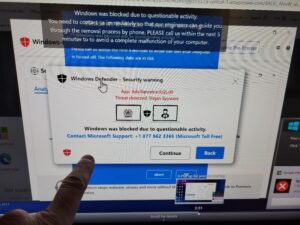
3. People routinely call 1-800 numbers after they have accidently landed on a fake website on the internet or getting a browser infection that won’t let them close their browser.
Often times these sites sound an alarm and tell the user they have done something wrong and need to contact Microsoft, Norton, or other trusted websites via the number on the screen. This is not a hack – it’s a straight-out scam. If you call the number and give remote access to your computer you can be conned out of a payment for bogus services or even your entire bank account.
4. Sometimes I get a call from a customer claiming “My Facebook was hacked.” This is rarely the case. Usually, a third part has right clicked on the photo, set up a new Facebook Page on your behalf, and attempted to add your friends back so they can later attempt to scam your friends out of money. This is not a hack – it’s more a forgery, rather.
In conclusion, users should avoid blaming hackers for every issue that they face regarding their digital devices. Malware, tech support scams, IRS scams, bogus sham and scam phone calls, fake Facebook pages, phishing emails, drive-by browser pseudo-infections, and other scam attempts are just a few of the risks internet users face and mistake for hacking.
It is increasingly essential for computer users to educate themselves of online risks and take necessary cybersecurity measures to protect themselves. Also, you might want to think about getting a local computer repair and service person they trust so they can have a consultant to discuss these matters. But remember – you probably weren’t hacked – you probably just made a bad decision.
[socialring]
Top 5 Complaints About Windows 11 2026
As a mobile or on-site computer repair tech in Louisville, KY I have the benefit of seeing lots of different problems related to computer repair. Being in a large MSA in the United States gives me the opportunity to see a wide variety of computer problems as they unfold in real time. Since October of 2021 when Microsoft released Windows 11 here a few of the main complains I have heard about it.
1. Incompatible or outdated hardware: Many users have complained about the minimum system requirements for Windows 11, which have excluded older machines that were running Windows 10. According to Microsoft nothing earlier than an 8th Gen Intel processor (and the comparable AMD processor) is fully compatible. This has forced many people to spend money on upgrading their hardware before the average life expectancy of the machine was even reached. Also, I’ve done many new computer hookups for Windows 11 where the printer or other peripherals didn’t work anymore and had to replaced also. I think this is a bit of a legitimate complain by users. What do you think?
2. Graphical User Interface(GUI): GUI is the way your computer looks when you turn it on. Windows 11 has received positive reviews for its fresh and modern GUI, resembling the Mac OS. However, some users have a mixed reaction, and they complain about certain design choices, such as the center placement of the start menu and several other changes to the taskbar. Of course, a good computer repair doctor can fix all this and make Windows 11 look just like Win 10, Win 7, etc.
3. Limited customization: Despite a windows patch update providing new customization features, several users have reported feeling limited in their ability to personalize their desktops and taskbars.
4. Removal of Live Tiles: Windows 10’s live tiles were seen by some as an innovative feature that allowed users to view app notifications and updates on the start menu and were hated by many. Windows 11 replaces them with static icons, frustrating users who liked the functionality of the tiles.
5. Windows Updates failing to install: One of the newest complaints I am seeing more and more of is Windows 11 updates simply failing to install correctly. In March of 2026 Microsoft actually had to pull an update shortly after release because it would not install on many machines and would just loop or throw error messages. This kind of thing can leave users stuck, unsure if their system is up to date or secure, and sometimes requires manual intervention to fix. I’ve personally seen machines sit there trying to update over and over again with no success, which causes a lot of frustration for everyday users who just want their computer to work.
In addition to these common complaints, I have also noticed that many users simply struggle with change. Even small adjustments in layout, settings locations, or how basic functions operate can throw people off, especially if they have been using the same version of Windows for years. A big part of my job ends up being not just fixing machines, but helping people feel comfortable and confident using their computers again.
Another thing worth mentioning is that many of these issues can be resolved fairly quickly with proper setup, updates, and configuration. A lot of frustration comes from machines not being optimized correctly right out of the box. With the right adjustments, driver updates, and a little customization, Windows 11 can run smoothly and efficiently on supported hardware.
Like every OS that Microsoft releases, Windows 11 has received mixed reviews, with many users finding fault in everything from the user interface to compatibility and other features. In reality, Windows 11 is a great OS just like Windows 7 and 10, and there really isn’t much difference. Windows 11 can be configured to run almost exactly like operating systems of days past. Sometimes you just might need a little help getting it back the way you need it.
[socialring]
Recent Computer Based Scams – Phone, Email or Pop-up Type
Recent Computer Based Scams – Phone, Email or Pop-up Type
There are all kinds of computer related scams. You might have received a call from someone falsely claiming to be from the “FBI”, “IRS”, Microsoft, Norton, UPS or othres. You’re told that the only way you can save yourself is to pay an imaginary fine, and then the caller will save you from the authorities, computer infections, etc. Sometimes they approach you from an email or pop-up on a website.
Often an email will attempt to convince you it’s FedEx, or Chase Bank – for example– but you don’t have a package scheduled or bank account with Chase Bank.
Or you go to a website and something pops up in your face and tells you it’s Microsoft and gives you a 1-800 Number to call,
How can this be done? Easily, if you’re silly enough to play along. You’re often then advised to download and install a remote access program and then you have lost control of your computer. You are then given the privilege of paying for this service, usually several hundred dollars. Guess what, now they have your credit card or debit card information, too!
How to Identify Computer Scams:
1. A company isn’t going to call you to initiate technical support. Think about it. Would Microsoft, or any other large company, care enough to spend resources reaching out to you to solve your computer issue? Unlikely. Try getting tech support when you need it, and you’ll quickly realize how silly it is to believe they’re going to track you down when you need help.
2. Think slowly and logically about emails. Any business email should be suspect.
3. Web or Email based tech support scams aren’t live. You’ll often hear a recorded message telling you to either call a number or get an email that is a pretend email and not from the person it claims.
A computer based scam that is initiated online might arrive as a pop-up or redirect you from a webpage to another website.
1. Is the URL is nonsense? Instead of a website like www.microsoft.com, you’ll see something like www.12742xmicrosofttechsupport.net.
2. You’ll often have trouble closing the webpage. The window will expand to take over your entire screen. You might lose access to your toolbar, too. The easy solution is to ctrl-alt-delete and click then on the “task manager” option. Simply close your browser from there.
3. You might hear an alarm or other obnoxious sound. This is to create a sense of urgency. Again, you might lose control of the active window. There might be a message informing you there is malware on your computer. Just turn down the volume, and use the ctrl-alt-delete trick.
All of these computer based scams ultimately aim to separate you from your money. Trust your instincts, stay calm, and ignore all of these scams. They can’t harm you unless you help them to do so.
[socialring]
The Myth of Computer Backups
Do you backup your computer? Is that what you’re really doing? Most likely, you’re only backing up your data. A complete system recovery requires keeping track of a lot of non-file data, too. This includes the boot sector, partition layout, and file and system metadata. And you want to know a secret? It’s not really needed.
There are several methods for backing up your data:
- RAID. RAID stands for “redundant array of inexpensive disks”. Many computers can be configured to use a second hard drive that will mirror the primary hard drive. Whatever happens to one drive, happens to the other. You always have an instantaneous copy of all of your files. The disadvantage of this is that your backup is kept with your computer system. This is a serious issue in the case of theft, fire, flood, or other disaster.
- External hard drive. This is a simple solution that allows you to keep your backup files separate from your computer. This is a simple and inexpensive solution worth considering. It’s possible to use USB sticks to the same end. However, a hard has the potential to store much more data than a single USB stick.
- Cloud backup. It’s also possible to back up your computer to a server in a remote location. You’ll always have access to your data, no matter where you are in the world. However, there’s always the risk of someone hacking into your data. There’s also a monthly cost associated with using this type of service. Also, uploading all of your files to the cloud can take a lot of time and destroy your internet and computer performance.
These are the basic options available to the average computer user. Backing up to an external hard drive is the best option for most computer users. It’s a reliable, inexpensive, and portable way to backup your data.
How often do you need to backup your data? That’s up to you, but once a month is sufficient for most situations. Think about how often you’re adding, or altering files on your computer. Pick a backup schedule that makes sense for your situation.
[socialring]
PC vs. Mac: Which Reigns Supreme?
 In the ever-evolving landscape of personal computing, the debate between PC and Mac users remains as fervent as ever. Both platforms have their ardent supporters, and each offers a unique set of advantages. Whether you’re a tech enthusiast, a creative professional, or an average user, choosing between a PC and a Mac can significantly impact your computing experience. This article dives into the core differences, strengths, and weaknesses of each, helping you make an informed decision.
Hardware and Customization
PC:
PCs are renowned for their hardware versatility and customization options. The market offers a plethora of choices from various manufacturers, such as Dell, HP, and Lenovo, catering to a wide range of budgets and performance needs. One of the standout features of PCs is the ability to upgrade components like RAM, storage, and graphics cards easily. This modularity ensures that users can keep their systems up-to-date without investing in a brand-new machine.
Mac:
Apple’s Mac lineup, including the MacBook, iMac, and Mac Mini, is celebrated for its sleek design and build quality. Macs are known for their seamless integration of hardware and software, which often results in a more stable and efficient user experience. However, the downside is the limited customization. Upgrading a Mac’s internal components is typically more challenging and, in many cases, impossible for the average user.
Operating System
PC:
Most PCs run on Microsoft Windows, the world’s most popular operating system. Windows offers a familiar interface and broad software compatibility, making it a versatile choice for various applications, from gaming to business. Windows 10 and the newer Windows 11 have continued to enhance user experience with features like improved security, virtual desktops, and seamless updates.
Mac:
Macs operate on macOS, known for its clean interface, robust security, and seamless integration with other Apple products like the iPhone and iPad. macOS is particularly favored by creative professionals for its powerful native applications like Final Cut Pro and Logic Pro. Additionally, macOS is built on a Unix foundation, providing a stable and secure environment ideal for developers and power users.
Software and Ecosystem
PC:
The PC ecosystem is vast, with a wide array of software available for virtually every purpose. PCs are particularly dominant in the gaming industry, boasting extensive game libraries and superior compatibility with the latest titles. Additionally, PCs support a broader range of professional software, particularly in fields like engineering and data analysis.
Mac:
Macs shine in the creative sector, with a suite of high-quality applications for video editing, graphic design, and music production. The Apple ecosystem offers unparalleled synergy between devices, making it easy to transition between tasks on an iPhone, iPad, and Mac. However, Macs often face limitations in software availability, particularly in niche professional areas and gaming.
Security
PC:
Windows PCs have historically been more susceptible to malware and viruses, primarily due to their widespread use. However, Microsoft has made significant strides in enhancing security features with built-in antivirus programs and advanced threat protection in Windows 10 and 11. Users can further bolster their security with third-party antivirus solutions.
Mac:
macOS is renowned for its robust security features. Apple’s controlled ecosystem and Unix-based architecture provide a strong defense against malware. Additionally, Macs come with built-in security tools like XProtect and Gatekeeper, which help prevent unauthorized software from running. While no system is entirely immune, Macs generally experience fewer security threats.
Price
PC:
One of the most significant advantages of PCs is their price range. PCs cater to all budgets, from affordable options suitable for basic tasks to high-end machines designed for gaming and professional workstations. This flexibility makes PCs accessible to a broader audience.
Mac:
Macs are generally positioned as premium products, with a higher entry price point. While the initial investment is substantial, many users justify the cost with the long lifespan, high resale value, and overall performance of Apple devices. Additionally, Apple’s education and financing programs can make Macs more accessible to students and professionals.
Conclusion
Choosing between a PC and a Mac ultimately depends on your specific needs, preferences, and budget. If you value customization, a vast software library, and affordability, a PC might be the better choice. On the other hand, if you prioritize design, security, and a seamless ecosystem, a Mac could be the ideal fit. Both platforms have their unique strengths, and understanding these can help you make an informed decision that aligns with your personal or professional requirements.
No matter your choice, both PCs and Macs offer powerful, reliable options for users in the modern computing world.
[socialring]
The Antivirus Software Scandal
There was a time that most computer users were terrified of malware. The only logical response was to install antivirus software on your computer as soon as possible. And there was a good reason; it’s hard to find someone that didn’t suffer from a malware attack at some point. But do you really need antivirus software?
Read on and decide for yourself.
- Windows includes free, high quality antivirus software called Windows Defender. You’ve already paid for Windows, whether you realize it or not. If you’re using Windows 10, there isn’t a good reason to spend your money on additional antivirus protection.
- Historically, Windows antivirus programs were underwhelming, but testing shows the newest version of Windows deals with viruses and other malware just as well as the third-party vendors software.
- Antivirus software slows your computer. Antivirus software updates itself frequently. This can bring your computer speed down to a crawl. An antivirus program is always running and hogs system resources.
- By default, antivirus programs are always out of date. Antivirus software is developed to deal with existing viruses. When a new virus is released, you’re not protected until the company that developed your antivirus software puts in the time, energy, and money to address it. During that time, your antivirus program is worthless.
- The companies that make antivirus software aren’t always trustworthy. There have been several scandals involving antivirus software developers. One popular antivirus company is in hot water for selling user web browsing information to third parties. Another manufacturer of antivirus software has been accused of spying for the Russian government.
- Antivirus programs have a lot of control over your computer system. They see everything. Do you have complete trust that your information is being kept safe?Everyone must take responsibility for their computer security, but many experts believe that a third-party antivirus program is unnecessary today. It destroys computer performance, and it’s an unnecessary expense.
Do you need antivirus software? No. Be responsible in your internet and email use and continue to improve your digital navigation skills. That means be careful with email attachments, and be careful about downloading any executable files. You don’t have to spend extra money to keep your computer safe – you need to become a better computer user.
[socialring]
Computer Performance Essentials – Why is Your Computer Slow? Part 3: Network
You might not think of your home computer as being part of a network, but it is. Your internet speed, router, network complexity, phone, TV, extenders, additional computers, and other devices can all impact the speed of your computer while using the internet. Let’s see if your network is degrading the speed of your computer.
Your computer network can limit the speed of your computer:
- Signal Strength: Up to a certain point, a stronger WiFi signal results in faster upload and download speeds. So, the strength of your WiFi signal can impact your computer’s speed while using the internet.
- Download Speed: Even if your WiFi signal is at full strength, your internet connection might be slow. This is one of the easiest issues to check. There are several websites that can do a speed test on your internet connection and provide you with the results. One example is https://www.speedcheck.org/
- Extenders: A WiFi extender can be handy for extending the range of your WiFi signal, but extenders can drastically reduce the speed of your internet connection. Some can cut the effective internet speed by as much as 50%. It depends on the design of the extender, but all extenders result in some speed loss.
- Number of computers on the same system: Your internet connection, no matter how fast, has a limit on how much information can pass back and forth. With enough computers using the same network, there can be a significant loss of internet speed.
- Complexity: How complex is your system? Phones, TVs, virtual assistants, home automation devices, WiFi thermostats, wireless security cameras, and any other device that uses your WiFi connection can reduce the speed of your computer while using the internet.
- Phones: Many home and business phone systems use the computer router to make and receive calls. This can also reduce speed.
- Television: With more streaming options available today, many people are using their internet connection to watch TV instead of using satellite or cable TV. This can also slow down your internet access.
If you’re using the internet, your computer is part of a computer network. Every device on that network has the potential to make your computer slower. The strength of your internet connection, the use of extenders, and the download speed of your internet connection can also be factors.
Most casual users fail to take their computer network into account when diagnosing poor computer performance. However, as the internet becomes more relevant, the quality and size of your computer network becomes more relevant.
[socialring]

RSS Feed
