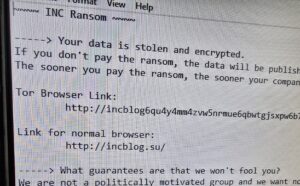
 I just did a job at a lawyer’s office in Louisville where all the data on the server was encrypted. They almost lost everything. It was a password compromise issue. As more of our lives move online, internet security has become one of the most critical concerns for both individuals and businesses. Cybercriminals are constantly evolving their methods, often relying on simple but highly effective techniques to gain unauthorized access to accounts and systems.Understanding how these attacks work is the first step toward protecting yourself or your organization.
Password Compromise Techniques: They are Guessing, Spraying, Harvesting, Cracking, Stuffing.
1. Guessing
Guessing is one of the most basic forms of compromise. In this attack, a threat actor attempts to log into an account by trying commonly used passwords or combinations based on personal information.
Attackers may try:
Simple passwords like “123456” or “password”
Names, birthdays, or addresses
Slight variations of known passwords that are often from known data breeches
“The PC Sunflower” (looking for post-it notes with your password over your shoulder at work, or in your home, at the airport, etc.)
Why it works:
Many users still rely on weak or predictable passwords, making accounts easy targets.
How to protect yourself:
Use long, complex passwords
Avoid personal information use as passwords (instead make them random)
Enable multi-factor authentication (MFA)
2. Spraying
Password spraying is a technique where attackers try a small number of common passwords across a large number of accounts, instead of repeatedly attacking a single account.
For example:
Trying “Welcome123” across hundreds of usernames
Avoiding lockouts by limiting attempts per account
Why it works:
It bypasses security systems designed to stop repeated login attempts on a single account.
How to protect yourself:
Enforce strong password policies
Use MFA across all accounts
Monitor for unusual login activity
3. Harvesting
Harvesting refers to the collection of usernames and passwords, typically through deceptive methods like phishing.
Common tactics include:
Fake emails posing as legitimate companies
Fraudulent login pages that capture credentials
Malicious links or attachments
Why it works:
It exploits human trust rather than technical weaknesses.
How to protect yourself:
Be cautious with unexpected emails
Always verify website URLs
Educate users and employees about phishing
4. Cracking
Cracking involves using specialized software to break encrypted passwords, often after hackers obtain stolen data from breaches.
Common methods include:
Brute force attacks (trying every combination)
Dictionary attacks (using common word lists)
Rainbow table attacks (precomputed hash matching)
Why it works:
Weak passwords and outdated encryption can be broken quickly with modern computing power.
How to protect yourself:
Use strong, unique passwords (12+ characters)
Avoid common words and patterns
Ensure modern password hashing is used (for businesses)
5. Stuffing
Credential stuffing uses stolen username and password combinations from previous data breaches to access other accounts.
Because many people reuse passwords, attackers can gain access to multiple accounts using the same credentials.
Why it works:
Password reuse is widespread, and massive databases of stolen credentials are easily available online.
How to protect yourself:
Never reuse passwords across sites
Use a password manager
Enable MFA on all important accounts
Monitor for data breaches
Final Thoughts
Even though these attack methods vary in complexity, they all take advantage of the same weaknesses: weak passwords, password reuse with mild variations, and human error.
By understanding how guessing, spraying, harvesting, cracking, and stuffing work, you can take the needed steps to secure accounts and reduce risk.
Cybersecurity doesn’t have to be complicated—but it does have to be taken seriously. Hopefully these thoughts about the common problems I see as an actual computer repair practitioner at my local computer service company and some of these preventative techniques will save you from having to have me or someone like me out after a data loss catastrophe.
[socialring]


RSS Feed
