 Ever feel a pit in your stomach when you see a suspicious email, a sluggish computer, or a weird Facebook notification? You’re not alone! Many people jump to the conclusion they’ve been hacked, but in reality, it’s almost never the case. Let’s debunk the myths and separate the “hack” from the “harmless.” Shall we?
Maybe we can start by defining what hacking means. According to the computer security company Kaspersky: Hacking is the act of identifying and then exploiting weaknesses in a computer system or network, usually to gain unauthorized access to personal or organizational data. I like that definition. “Unauthorized” is the key word, I think.
Myth #1: Every Odd Email Means a Hacked Account
So if I see emails with strange subject lines, misspelled senders, and dubious attachments are those hacks? No, that’s regular spam and phishing spam. While these can be phishing attempts (a sneaky way to steal your information), they don’t necessarily mean your account has been hacked. Think of them as relentless telemarketers of the digital age – annoying, but not a sign of a break-in.
Myth #2: Slow Computer is a Hacker
Yes, a malware infection can definitely slow down your computer. However, a sluggish computer is usually the result of bad specs and bad software environment management or bad internet – not a hack. Before you panic about a hacker try using a local computer repair shop in Louisville, KY or wherever you are to help you evaluate the poor PC performance.
Myth #3: Facebook Friend Request From Someone Already on Your Friend List or a Random Person or my Friends Say I Have an Imposter Account Means I’m Hacked?
Even if someone has created a Facebook page with your stolen picture and sends out friend requests in your name. It’s not a hack. They’re attempting to scam your friends out of money.
So What Is The Real Chance I’ve Been Hacked?
Nearly zero.
Fighting Spam and Staying Secure
Don’t let spam emails or a slow computer or a phony duplicate Facebook account send you into a hacking frenzy. Most of these spam threats can simply be ignored and they will go away. But here are a few tips:
Be Spam Savvy: Identify spam emails and report to your email provider.
Strong Passwords: Use unique, complex passwords for all your online accounts.
Regular Backups: Back up your important data regularly to an external hard drive.
When in Doubt, We’re Here to Help!
If you’re still concerned about a potential hack, and need Computer Hacking Help in Louisville, KY or simply want some peace of mind call our IT Security specialists at On-Site Louisville Computer Repair Co. — we are here for you! We offer diagnostic services to identify any security issues and can help you implement preventative measures and education to keep your computer and you safer. So, relax, breathe, and let us handle the tech troubles!
[socialring]

Author Archives: Chris Calkins
How to Avoid Computer Phishing Scams
 Phishing is a deceptive email or online message designed to trick you into revealing sensitive information, such as passwords or credit card details. Phishers often try to imitate legitimate companies or organizations to gain your trust. Here at On-Site Louisville Computer Repair Co., we see the consequences of phishing scams all too often, and we want to empower you to protect yourself!
In this blog post, we’ll cover:
• How to identify phishing scams
• What information phishers target
• How to protect yourself from phishing attacks
Spotting the Phish
Phishing emails can appear very convincing. Here are some red flags to watch out for:
• Sense of urgency: Phishers often try to pressure you into acting quickly, by claiming your account is at risk or a limited-time offer is about to expire. Take a deep breath and don’t be rushed into clicking anything.
• Generic greetings: Does the email address you by name? Legitimate companies will typically have your name in the salutation.
• Poor grammar and spelling: Many phishing emails contain typos or grammatical errors.
• Suspicious links: Hover your mouse over a link before clicking. A legitimate link should preview the actual destination in the bottom left corner of your browser window. Be wary of links with nonsensical text or shortened URLs.
• Unfamiliar attachments: Don’t open attachments from unknown senders.
What Phishers Want
Phishers are after a variety of personal information, including:
• Passwords (email, bank accounts, social media)
• Credit card numbers
• Social Security numbers
• Other personal details used for identity theft
Protecting Yourself
Here are some key steps to take to avoid phishing scams:
• Don’t click on suspicious links or attachments.
• Be cautious about unexpected emails, even if they appear to be from a legitimate source. If you’re unsure, go to the company’s website directly (by typing the web address yourself, not clicking a link in the email) and log in to your account to see if there are any messages.
• Never provide personal information through email. Legitimate companies will not ask for sensitive information via email.
• Use strong, unique passwords for all your online accounts. Enable two-factor authentication whenever possible for an extra layer of security.
• Keep your computer software up to date, including your web browser, operating system, and security software.
• Be wary of social media scams. Phishing attempts can also happen through social media messages.
By following these tips, you can significantly reduce your risk of falling victim to a phishing scam.
We’re Here to Help!
If you have any questions about email phishing scam mitigation or hack recovery or computer scam recovery and removal or other computer security threat help in louisville, KY, please don’t hesitate to contact On-Site Louisville Computer Repair Co. at (502)963-3981. Our team of experienced technicians is happy to help you stay safe online.
[socialring]
Do I Need My Computer Serviced Even Though It Seems Fine?
 Your computer is humming along, handling tasks with ease and speed. Everything seems perfect, so why bother with servicing? It’s a common misconception that only malfunctioning computers need attention. In reality, regular PC servicing is crucial for maintaining performance, preventing problems, and extending the lifespan of your device.
1. Enhancing Performance
Even if your PC is currently running well, it doesn’t mean it’s operating at peak efficiency. Over time, software updates, temporary files, and system clutter can accumulate, slowing down your computer. Regular servicing involves cleaning up these unnecessary files, optimizing system settings, and updating drivers. This not only speeds up your PC but also ensures that it continues to perform optimally for your tasks.
2. Preventing Hardware Issues
Components like fans, heat sinks, and hard drives can accumulate dust and debris, leading to overheating and potential hardware failures. Routine servicing includes cleaning these components, ensuring proper airflow, and checking for any signs of wear or impending issues. By addressing these concerns early, you can prevent costly repairs or even the need for a full replacement down the line.
3. Security Updates
Cyber threats are constantly evolving, and keeping your PC secure is paramount. Regular servicing involves installing security updates, patches and having a qualified technician do a virus check. Ignoring these updates and avoiding service by a qualified computer service company can leave your computer vulnerable to security breaches and data loss.
4. Extending Lifespan
Just like any machine, your PC requires regular maintenance to last longer. Sometimes you need to replace an old part like a drive or a fan. Professional servicing helps identify and address potential problems BEFORE they escalate, reducing the risk of sudden breakdowns or system failures. By taking proactive measures, you can extend the lifespan of your PC and get more value out of your investment.
5. Peace of Mind
Perhaps the most underrated benefit of regular PC servicing is the peace of mind it brings. Knowing that your computer is well-maintained, secure, and optimized allows you to focus on your work or leisure activities without worrying about unexpected issues or slowdowns.
In conclusion, even if your PC is currently running smoothly, regular servicing by a qualified local computer repair company is essential for maintaining performance, preventing hardware and software issues, staying secure, extending lifespan, and ensuring peace of mind. Schedule periodic check-ups and servicing sessions to keep your computer in top condition and enjoy uninterrupted productivity. For more information on computer tune-ups in Louisville, KY feel free to call us now at (502)963-3981.
[socialring]
Firefox vs Chrome vs Safari vs Edge – Which Is Best? The Sage Continues . . .
 In the vast sea of the internet, your web browser is your ship. It’s how you navigate the digital world, explore new websites, and interact with online content. But with so many browsers available, choosing the right one can feel overwhelming. Here’s a breakdown of the four major contenders: Firefox, Chrome, Safari, and Edge, to help you chart your course.
• Speed Demons: When it comes to raw speed, Chrome generally reigns supreme. It boasts a powerful engine (Chromium) and tight integration with Google services, making it a favorite for many users. However, Edge, built on the same Chromium foundation, is catching up and some people think it offers a smoother experience on Windows machines.
• Privacy Protectors: If online privacy is your top concern, Firefox is your champion. It prioritizes user privacy with strong built-in tracking protection and a focus on user control. Safari also offers decent privacy features, especially within the Apple ecosystem. Chrome and Edge (Google and Microsoft), on the other hand, both collect more user data, which can be a turnoff for privacy-conscious users.
• The Extension Experts: For those who love customization, Chrome and Firefox are the extension kings. They offer vast libraries of extensions that can supercharge your browsing experience, adding features like ad blockers, password managers, and grammar checkers. Edge has a growing extension store, but Safari’s selection is more limited.
• Device Compatibility: When it comes to using your browser across different devices, Chrome and Firefox are the most versatile. They offer versions for Windows, macOS, Android, and iOS, ensuring a seamless experience regardless of your device. Safari, however, is mostly exclusive to Apple devices, and some people think Edge works best on Windows machines, although there are versions for macOS and mobile.
• The Ecosystem Advantage: Chrome and Edge offer a tight integration with their respective ecosystems (Google and Microsoft). This can be convenient if you heavily rely on their services like Gmail or OneDrive. Safari integrates seamlessly with Apple products, while Firefox is more independent, offering a platform-agnostic experience.
Ultimately, the best browser for you depends on your individual needs and priorities. Consider what factors matter most to you – speed, privacy, customization, or device compatibility – and choose the browser that best aligns with your preferences. So, set sail, explore the web, and discover the browser that charts your course perfectly!
[socialring]
Facebook Marketplace Scams Are Increasing
 In today’s digital age, online marketplaces like Facebook Marketplace offer convenient platforms for buying and selling goods. However, alongside the convenience comes the risk of encountering scams. These scams can be buyer scams or seller scams. That means scams to steal your money as you try to purchase as a buyer OR fake purchasing to steal your items you have listed sale. Understanding the common tactics used in Facebook Marketplace scams and learning how to protect yourself is essential for a safe and enjoyable online shopping experience.
One prevalent type seller scam involves fraudulent listings. Scammers create enticing ads for products at unrealistically low prices or for items that don’t exist. They may use stolen photos and descriptions from legitimate sellers to make their listings appear genuine. Unsuspecting buyers who fall for these scams end up sending money to the scammer often via PayPal, Cash App, Venmo or Zelle – only to receive nothing in return. While the buyer has recourse through Facebook Marketplace guarantee – the scammer often convinces the buyer to send money off Facebook. This is often impossible to claw back.
A popular buyer scam is phishing. They may send messages posing as interested buyers. They ask you if they can go ahead and pay via PayPal, Cash App, Venmo or Zelle then they send someone to come pick u the item. Later, they reverse the transaction. In some cases, they use a stolen account to make the purchase. By that time, they have run away with your item. This is often used for expensive items like computers, etc.
To protect yourself from Facebook Marketplace scams, it’s crucial to stay vigilant and follow these tips:
When Buying: Always verify the legitimacy of listings before making any transactions. Look at a seller’s other listings. Do they look normal? Verify the location of the seller. Is it even in the USA? Look at their reviews and read them. Do they seem legitimate? Look at their personal profile. Does it check out as far as a common-sense sniff test?
When Selling: Meet in person and arrange to meet the seller or buyer in a public place or at your house if you trust them. View the buyer’s personal profile. Does it check it? Are they in the USA? Do they want to pay first with PayPal, Cash App, Zelle or Venmo and then pick it up later? Refuse this and require cash only for local pickups and let Facebook process transaction for non-local items that require shipping.
Trust Your Instincts: If something seems too good to be true or if you feel uncomfortable about a transaction, trust your instincts and walk away. It’s better to be cautious than to fall victim to a scam.
Only use Facebook’s messaging system to communicate with buyers or sellers rather than Email, cellphone or other non-Facebook messaging systems.
Additionally, report suspicious buyers or sellers to Facebook Marketplace. They have mechanisms in place to investigate and take action against fraudulent users. By staying informed, cautious, and proactive, you can significantly reduce the risk of falling prey to Facebook Marketplace scams.
In conclusion, while Facebook Marketplace offers a convenient platform for buying and selling, it’s important to be aware of potential scams and take steps to protect yourself.
[socialring]
Windows 7 Backup Tool: A Relic Past Its Prime?
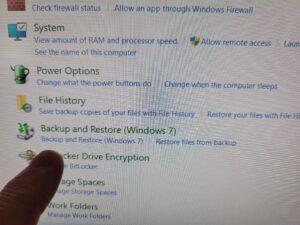 While Windows 10 and 11 inherited the Windows 7 Backup and Restore tool, some users might be surprised to learn that Microsoft itself recommends against relying solely on it for complete system protection.
There are a few reasons behind this:
Limited Functionality: The Windows 7 tool primarily focuses on creating system images, which capture your entire operating system, programs, and user data. This is great for restoring a crashed system, but it doesn’t offer features like incremental backups (capturing only changes since the last backup) or file-level restoration, which can be crucial for recovering specific documents or applications.
Security Concerns: The tool utilizes outdated technology and might not be as robust against emerging cyber threats.
Focus on Modern Solutions: Microsoft actively promotes its cloud-based OneDrive storage solution and File History, a feature that continuously backs up specific user folders. These options offer greater accessibility and potentially more robust security measures.
Alternatives for Robust Backups:
While the Windows 7 tool can still serve as a basic backup option, consider these alternatives for a more comprehensive approach:
Third-Party Backup Software: Numerous reputable companies offer feature-rich backup software. These programs often provide options for system image backups, incremental backups, file/folder selection, scheduling, and cloud storage integration. Popular choices include Veeam Agent for Microsoft Windows, AOMEI Backupper, and EaseUS Todo Backup.
File History: Built into Windows 10 and 11, File History continuously backs up designated folders like Documents, Pictures, and Desktop. This ensures you have recent versions of your important files in case of accidental deletion or system issues. However, it doesn’t capture your entire system.
Cloud Storage Services: Cloud storage platforms like OneDrive, Dropbox, and Google Drive offer automatic file backups and version control. While not a complete system replacement, they provide a secure offsite repository for your crucial documents.
You want the truth from a 30 year computer repair clinician that does front line computer repair every day in a major metropolitan area in the USA? Don’t use any of these. Simply copy your library to a flash drive every 30,60,90,365 days or whatever interval is appropriate for you. Very simple. Or better yet call me and do something else.
[socialring]
Benefits of In-Home or On-Site Computer Repair and Service
 1. Convenience: One of the primary benefits is convenience. Customers don’t have to disconnect their computer systems and take them to a repair shop. Instead, technicians come directly to their location, saving time and effort.
2. Personalized Service: In-home or on-site services offer a more personalized experience. Technicians can interact directly with customers, understand their specific needs, and provide tailored solutions accordingly.
3. Quick Turnaround Time: On-site services often result in faster turnaround times compared to off-site repairs. Technicians can diagnose and fix issues promptly, minimizing downtime for customers.
4. Hands-On Demonstration: In-home services allow technicians to provide hands-on demonstrations and tutorials to customers. This helps users learn how to prevent future problems and perform basic maintenance tasks.
5. No Risk of Damage During Transport: With on-site repairs, there’s no risk of damage during transport to a repair shop. This is particularly important for delicate equipment like desktops, monitors, and peripherals.
6. Minimal Disruption to Workflows: For small businesses, on-site repairs minimize disruptions to workflows. Employees can continue working while technicians resolve technical issues without interrupting operations.
7. Network and System Integration: Technicians can also assist with network setup, configuration, and troubleshooting on-site. This is beneficial for small businesses that rely on interconnected systems.
8. Transparent Pricing: In-home services often come with transparent pricing. Customers can get a clear understanding of the costs involved upfront, without hidden fees or surprises.
9. Builds Trust and Relationships: Providing on-site services helps build trust and long-term relationships with customers. They appreciate the convenience and personalized attention, leading to repeat business and referrals.
10. Customized Solutions: Technicians can offer customized solutions based on the customer’s environment and requirements. This ensures that the repairs or upgrades are tailored to meet specific needs.
[socialring]
How Long Does It Take to Repair Your Computer? The Time Frame Demystified
 When people call me about a computer repair at my computer service company in Louisville, KY they usually want to know two things — how much and how long. In today’s digital world, where our lives are intertwined with technology, encountering PC issues is not uncommon. Whether it’s a slow computer, a tech support scam, hardware malfunction, broken laptop screen, software glitches, or something else – dealing with these problems can be frustrating. And as I said people want to know how long they will be without their computer! Let’s delve into this topic to understand the variables that influence repair times and what you can expect during the process.
Issue Complexity: The complexity of the problem plays a significant role in determining repair time. Minor issues like software conflicts or driver updates can often be resolved relatively quickly – if you find a fast computer repair company – usually within a few hours. However, more complex issues such as hardware failures or severe virus infections may require several days to diagnose and fix.
Diagnosis Phase: The initial phase of PC repair involves diagnosing the problem accurately. This step is crucial as an incorrect diagnosis can lead to ineffective solutions and wasted time. I always tell people that diagnostics might be the most important part of a repair. Depending on the issue’s nature, the diagnostic phase can take anywhere from a few minutes to several hours. Not all techs are created equal.
Repair Techniques: The methods used to repair your PC also impact the time frame. For software-related issues, technicians may employ tools to scan for malware, repair corrupted files, or reinstall operating systems. These tasks can be completed in minutes or be completed on the same day or two days maybe. On the other hand, hardware repairs such as replacing a faulty hard drive or upgrading components may take longer, especially if parts need to be ordered.
Availability of Resources: Availability of resources such as spare parts, software licenses, and skilled technicians can affect repair times. If a specific component needs to be replaced and it’s readily available, the repair process can be expedited. However, sourcing rare or specialized parts may cause delays.
Service Provider: The expertise and efficiency of the service provider also play a vital role. And whether they are fast or not. Reputable computer repair centers with experienced technicians often have streamlined processes that result in faster turnaround times. Conversely, choosing an inexperienced or unreliable service provider may lead to extended repair durations. One thing to do is read reviews and see if customers talk about “turn-around times” or “fast” response and repair in their reviews.
Communication and Updates: Transparent communication between you and the repair service is essential. A reliable service provider will keep you informed about the progress of your PC repair, any unexpected challenges encountered, and an estimated completion time. Regular updates can help manage expectations and reduce anxiety about repair delays. Also good communication skills can expidite the repair process (that is good communication by the service provider and the customer, by the way).
Preventive Measures: In some cases, preventive measures may be recommended during the repair process to avoid future issues. This could include installing security software, updating drivers regularly, or implementing hardware upgrades. While these steps may add extra time to the repair process, they can enhance your PC’s overall performance and longevity.
Customer Cooperation: Your cooperation and responsiveness also contribute to timely repairs. Providing accurate information about the issue, promptly approving repair recommendations, answering text and calls by the service provider and following any post-repair instructions can help expedite the process.
In conclusion, the time required to repair your PC can vary significantly based on factors such as the complexity of the issue, diagnosis accuracy, repair techniques, availability of resources, service provider efficiency, communication, preventive measures, and customer cooperation. While some repairs may be completed within hours, others could take several days or longer. Choosing a reputable and experienced repair service, staying informed, and actively participating in the repair process can help minimize downtime and ensure a successful outcome for your PC.
[socialring]
To Fix or to Ditch? Repairing vs. Replacing Your PC
 The blue screen of death. The grinding fan. The agonizingly slow startup. These are all signs your once-proud PC might be on its last legs. But before you toss it and shell out for a shiny new machine, consider this: repair versus replace.
The answer like that perfect meme, depends. Here’s a breakdown of the factors to consider when deciding on your PC’s fate:
The Age Game: Generally, younger PCs are better repair candidates. For machines under 3 years old, a simple fix like a RAM upgrade or a new hard drive can breathe new life into them. However, for PCs pushing a decade, repairs might become a money pit, constantly playing catch-up with declining performance.
The Dollar Dilemma: Repair costs vary wildly depending on the problem. A quick software fix might be a steal, while a motherboard replacement could cost more than a budget-friendly new PC. Get a diagnosis from a trusted repair shop (or watch some DIY repair tutorials online) to estimate the repair cost.
The Performance Puzzle: Is your slow PC a constant source of frustration? Upgrading key components like RAM or the SSD or HDD or the graphics card can offer a significant performance boost. However, if your needs have drastically changed (think: casual browsing vs. high-end video editing), a new, used or refurbished PC with more powerful hardware might be a wiser investment.
The Eco-Ethical Edge: Don’t underestimate the environmental impact. Repairing your PC extends its lifespan, keeping e-waste out of landfills. If you do choose to replace, consider recycling your old PC or selling it for parts.
The Data Divide: Moving data to a new PC can be a hassle, especially with large files or complex setups. If you’re comfortable transferring data yourself or willing to pay for professional help, this might not be a major concern.
The DIY Dilemma: If you’re tech-savvy and comfortable tinkering, some repairs might be DIY projects. However, for complex issues, a professional’s touch can save you time, frustration, and potentially even further damage.
Ultimately, the decision hinges on your budget, your PC’s age and repairability, and your specific needs. By carefully considering these factors, you can choose the most cost-effective and environmentally responsible path, whether it’s a repair that keeps your old friend chugging along or a fresh start with a brand new PC.
[socialring]
Is it Safe to Take Your Computer to a Repair Shop? A Trustworthy Tech Tune-Up or Privacy Peril?
 The dreaded computer gremlin strikes. Your once-loyal machine sputters, groans, or refuses to budge altogether. Panic sets in, but a beacon of hope appears: the computer repair shop. Yet, a nagging doubt lingers – is it safe to entrust your precious device, brimming with personal information, to a stranger?
The answer, like most things in tech, is nuanced. Repair shops can be lifesavers, but navigating them requires caution. Here’s a breakdown of the risks and how to mitigate them:
The Data Domino Effect: Your computer harbors your documents, photos, and maybe even financial records. Unethical technicians could exploit this access.
Safeguard Strategy: Back up your data religiously. Cloud storage or external hard drives are your friends. If critical information remains, consider removing it before the shop visit (consult a professional for secure deletion methods if needed).
The Parts Prank: Replacing faulty components is a common repair, but some shops might install used or lower-quality parts, inflating your bill or compromising performance.
Transparency is Key: Ask about parts beforehand. Request genuine parts from reputable brands and get a written quote specifying what’s being replaced.
The Phantom Fix: Beware of shops that diagnose unnecessary repairs or inflate problems.
Knowledge is Power: Research common issues for your computer model. Be clear and concise when describing the problem. Don’t be afraid to get a second opinion if the diagnosis sounds fishy.
Finding the Trustworthy Techie: Not all repair shops are created equal.
Reputation Matters: Research online reviews and ask friends for recommendations. Look for shops with certifications from major tech brands.
Ask Questions: Don’t be shy! Inquire about their repair process, data security practices, and warranty policies. A shop comfortable answering your questions is likely a good sign.
By following these steps, you can transform your computer repair shop visit from a gamble into a strategic move. With a little preparation and the right shop, your computer will be back in fighting form, minus the security scare.
For more information call our computer repair shop in louisville, KY at (502)963-3981
[socialring]

RSS Feed
